Command Center
Command Center is the AI assistant that turns your PIONEER® data into answers, reports, and maps. Ask which pipes need attention, how to sequence work, or how a project is progressing, and Command Center analyzes your inspections, GIS data, cleaning records, risk scores, and rehab plans to deliver a defensible, polished report in minutes.
BOOK A DEMO →
Built for what people actually asked it to do.
Custom report templates in minutes
A sewer contractor created report templates that match its brand. Reports that used to take far longer now come together in 10 to 15 minutes.
A $1.5 million grant request finished before the deadline
A municipal sewer manager uploaded historical data, processed it with AutoCode, and built a grant request with Command Center. The request identified the highest-need assets, stayed on budget, and met the end-of-September deadline.
CCTV results into next-step reports
A service provider turned CCTV inspection results into next-step reports for municipal customers. Those reports helped identify more cleaning and rehab work.
GIS data reconciled and updated
A consulting engineer compared CCTV data with as-built GIS records, identified discrepancies, enriched the data, and created a layer to share with their municipal client.
What used to take a work week now takes one conversation.
Teams once exported data, moved between multiple tools, and formatted a deck for their leadership. Now you can ask Command Center for a risk-scored map and get one back that's color-coded, captioned, and ready to act on.
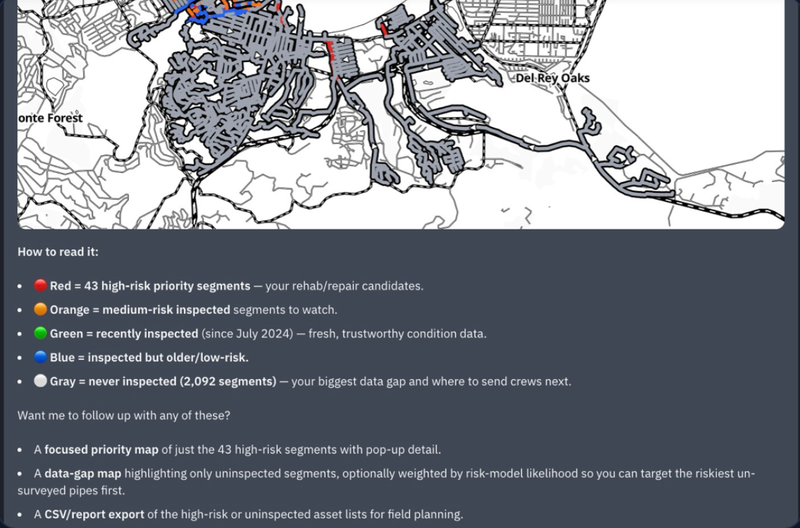
A sample of the questions people are actually typing into Command Center.
Polished reports & deliverables
Client-ready PDFs on your template, with your logo and photo layout. Built and reworked in minutes. “Create a video inspection report for project 4516. List each inspection individually.”
Rehab scoping & cost
Inspections, Risk & Rehab, and AMP data turned into a defensible scope and cost estimate. "Give a cost estimate that includes all needed work, including mobilization and restoration."
Maps & GIS work
Export to GeoJSON, add satellite layers, and plot defects straight from inspection data. "Provide a list and map of every grade 4 and 5 defect along Lincoln Ave."
Defensible inspection analysis
Apply PACP, MACP, and MSA logic, handle duplicate videos, close coverage gaps, and clear QA/QC backlog by reviewer. "Show me which operators have the most videos still missing review stamps."
Three steps. No new tool to learn.
Ask in plain language
Type what you need, whether it’s a report, a map, or a cost estimate, just as you would ask a colleague sitting next to you.
It works across your Pioneer™ data
Command Center analyzes your inspections, risk scores, cleanings, and rehab history with no need to export data or use a second tool.
Get an answer, report, or map
Council-ready, GIS-ready, or just the numbers you needed, delivered ready to use, and easy to revise later.
See Command Center in action
A walkthrough of asking a real question, narrowing down to the highest-risk pipes, and turning the results into a ready-to-download report, all within Pioneer.

Questions we hear most
Do I have to leave Pioneer™ to use it?
No. Command Center works inside Pioneer, directly against your own inspections, risk scores, and rehab data.
What can it actually produce, versus just answer?
Both. Ask a question and get an answer, or ask for a report, cost estimate, or map and get a finished, shareable deliverable.
What data can it see?
Only your account’s inspections, risk scores, GIS layers, and rehab history in Pioneer are used. No data from other customers’ accounts is included.
Can it change my data, or only analyze it?
Both, with a preview first. Bulk edits and field updates always show you exactly what will change before anything is committed.
Can it run on a schedule, not just on demand?
Yes. Turn any request, whether it’s a report, a map, or a data check, into a task that runs automatically on a recurring basis. That way, it’s ready and waiting for you, instead of the other way around.
Is it ready for a full rollout, or still early?
It’s live and in active use across dozens of utility, contractor, and engineering accounts today. The platform continues to improve as more teams use it.
READY TO GET STARTED WITH COMMAND CENTER?
See how Command Center can transform your sewer inspection workflow.
BOOK A DEMO →